Building Source Code
For details about the functions of the OpenHarmony compilation and building module, see Compilation and Building Guide.
Prerequisites
-
The required libraries and tools have been installed.
-
The compilation tools have been installed.
-
The Hello World program is ready for use.
-
The access to the Ubuntu environment is normal.
Procedure
Method 1: using hb for compilation (install compilation tools first)
Go to the root directory of the source code in the Ubuntu environment and perform the following steps:
-
Set the build path.
hb set -
Select the current path.
. -
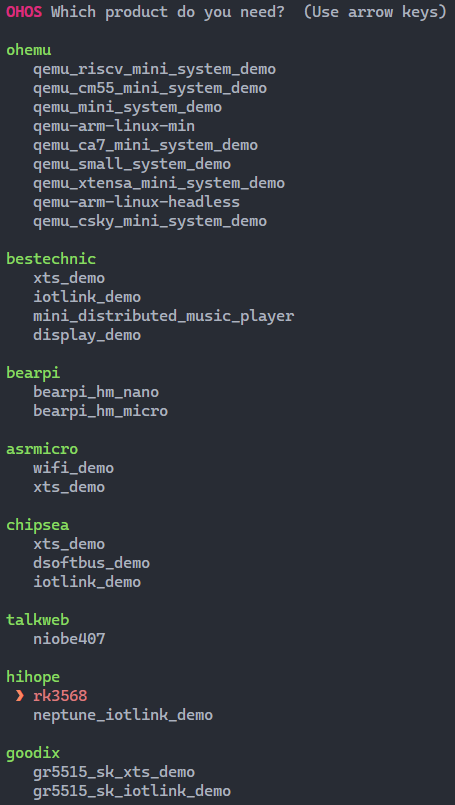
Select rk3568 under hihope and press Enter.
 NOTE
NOTEWhen adapting the development board to a specific use case, select an appropriate build form factor, that is, product settings. For details, see Build Form Factors.
Figure 1 RK3568 build settings
-
If you are building the source code into a 32-bit system, skip this step.
If you are building the source code into a 64-bit system, run the following command:
hb build --target-cpu arm64 -
Start building.
NOTE-
To build a component (for example, hello), run the hb build -T targetName command.
-
To build a product incrementally, run the hb build command.
-
To build a product from the scratch, run the hb build -f command.
This example builds a product from the scratch.
hb build -f -
-
Check the build result. If "rk3568 build success" is displayed, the building is successful.
 NOTICE
The build result and log files are stored in out/rk3568.
Method 2: using the build.sh script for compilation
For details, see Building Source Code Using the build.sh Script.
你可能感兴趣的鸿蒙文章
harmony 鸿蒙Getting Started with the Standard System with Hi3516 (IDE Mode)
harmony 鸿蒙Getting Started with the Standard System with Hi3516 (CLI Mode)
harmony 鸿蒙Hi3516 Development Board
harmony 鸿蒙Hi3861 Development Board
harmony 鸿蒙RK3568 Development Board